
iPhone app · Free
Ascend – Réveil
Up for real.
The alarm that only stops once you’re truly up. Pick your morning challenges, combine them, and gain altitude with every successful wake-up.

iOS 18+ · English, French · No ads, no tracking
How it works
01
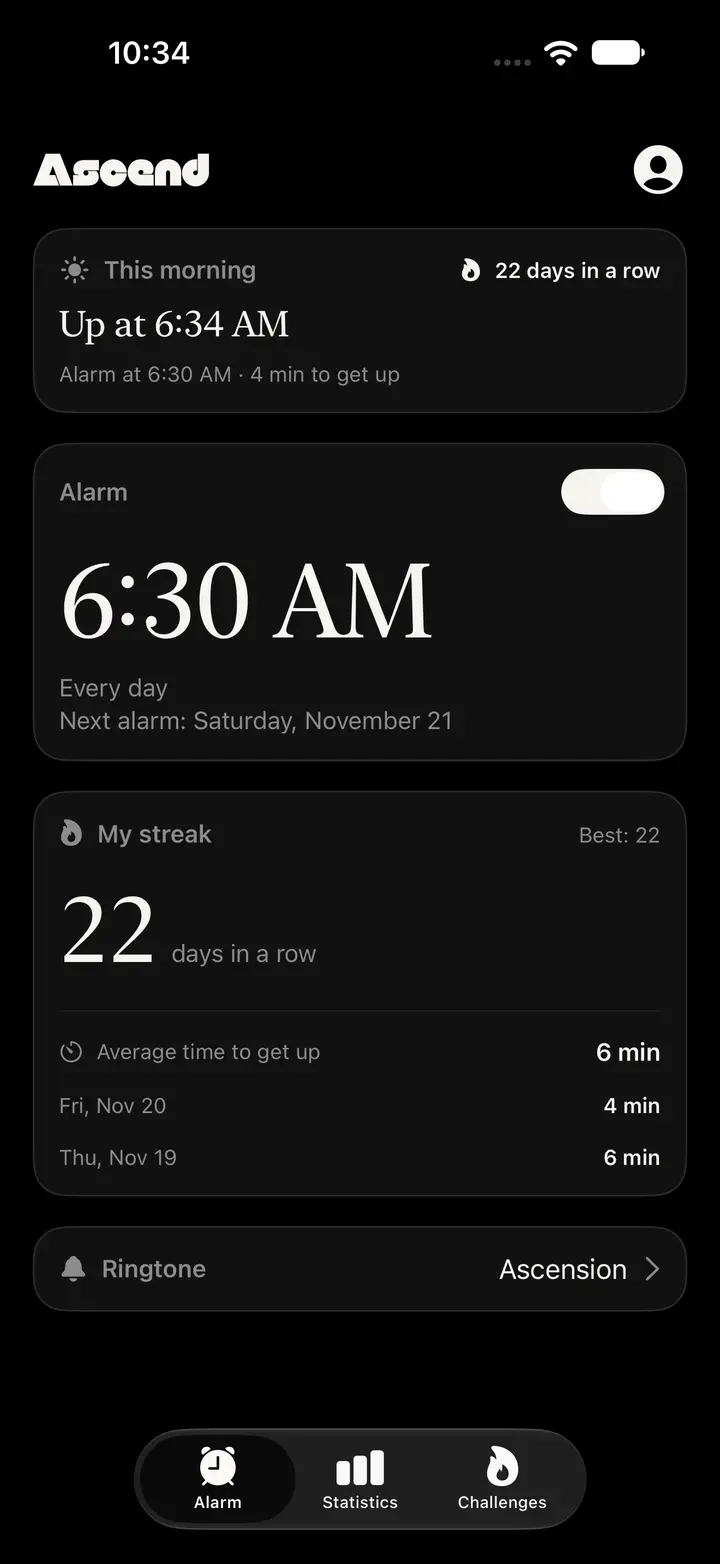
Set your alarm
Time, days, ringtone (calm, energetic or fun) and vibrations.
02
Pick your challenges
Phrase, object, bed, push-ups, squats: one or several, in the order object → bed → push-ups → squats → phrase.
03
The alarm rings
No snooze button. The system alarm keeps going until your challenges are done.
04
You’re up
Wake-up confirmed, altitude gained, streak extended. With Plus, 20 calm minutes to start well.
The morning challenges
Phrase out loud Free
Your goal phrase, a sacred text or a secular one. It is reworded every morning (on Apple Intelligence–compatible iPhones) so you have to actually read it. The microphone only listens to check; no audio is recorded.
Photo of an object Free
A random object in the rooms you pick (bedroom, kitchen, bathroom…). Image recognition on the iPhone; the photo isn’t kept.
Made bed PLUS
Your made bed, compared with your reference photo. One reference per place (home, hotel…). Free for 7 days, then included in Ascend Plus.
Push-ups Free
Counted by the front camera using body-pose detection: each way down counts as one push-up. Counting starts once the phone is steady.
Squats Free
Same idea: knee angle and hip-to-ankle distance. Adjustable target.


Progress
Altitude
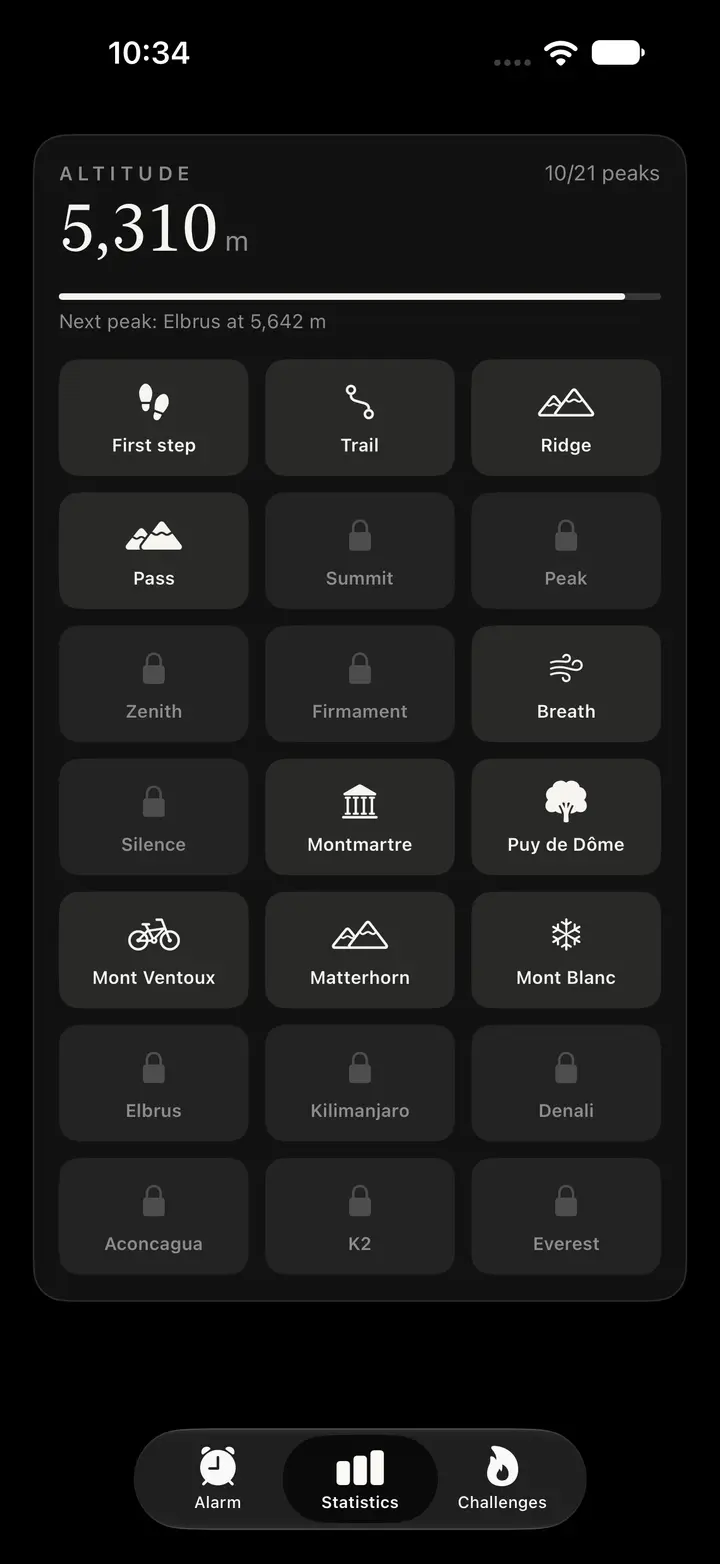
Each successful wake-up: 20 m + 2 m per day of streak (bonus capped at 30 days) + 30 m with the calm routine.
21 peaks
Milestones (First step, Trail, Ridge…) and 11 real summits, from Montmartre to Everest.
Streak & calendar
Streak, best streak, average time to get up, 3-month calendar.
Friends
Sign in with Apple, friend code, all-time and weekly leaderboards, wake-up nudges.
An alarm that’s hard to dodge
On iOS 26.1 and later, Ascend uses AlarmKit, Apple’s system alarm framework: the alarm rings even if the app is closed, with follow-ups. On iOS 18 to 26.0, backup sound notifications take over. For safety, an emergency exit appears after 15 minutes of ringing (that wake-up isn’t counted).
Pricing
Free
€0
- Phrase, object, push-up and squat challenges
- Texts from every tradition
- Bed challenge for 7 days
- Altitude, peaks, streak, calendar, friends
- No ads, no tracking
PLUS Ascend Plus
- Morning texts by theme
- “My why” in 9 questions
- Morning coach
- 20-minute calm routine (Lock Screen, Dynamic Island)
- Hard mode
- Bed challenge after the trial
Eurozone prices. The App Store shows your local price before purchase. Subscriptions renew automatically unless cancelled at least 24 hours before the end of the period.
Who is it for?
Frequently asked questions
What’s the best way to stop hitting snooze?
Make it impossible to turn the alarm off without getting up. That’s how Ascend – Réveil works: no snooze button, and the alarm only stops after your challenges (voice, photo, movement). Pair it with a consistent bedtime and bright light in the morning.
Does Ascend – Réveil work in silent mode or with a Focus on?
On iOS 26.1 and later, AlarmKit provides a system alarm comparable to the Clock app’s. On earlier versions, the app uses sound notifications: make sure Ascend’s notifications are allowed and that your Focus lets them through.
Do I need to keep the app open?
No. The alarm is scheduled by the system. You can close the app.
What if I can’t complete a challenge?
You can choose other challenges (at least one stays on) or use “Another passage” for the phrase. After 15 minutes of ringing, an emergency exit stops the alarm.
Does it work offline?
Challenges are analysed on the iPhone. Only friends and leaderboards (CloudKit) need the internet.
Can I use it in a hotel?
Yes: the bed challenge accepts one reference photo per place (home, hotel…), and you choose the rooms where the object can be picked.
Which traditions are available for morning texts?
Christianity (Bible), Islam (Qur’an), Judaism (Torah and Hebrew Bible), Hinduism (Bhagavad Gita…), Buddhism (Dhammapada…) and secular texts (Stoics, moralists). Public-domain translations with sources. Every tradition is free; choosing by theme is part of Ascend Plus.
How do I cancel Ascend Plus?
In Settings > your name > Subscriptions, at least 24 hours before the end of the period. Lifetime is a one-time purchase, not a subscription.
Is there an Android or iPad version?
Ascend – Réveil is designed for iPhone (iOS 18+). There is no Android version yet.
Is my data shared?
No. No ads, no tracking. Photos and voice are analysed on the iPhone. With an optional account, your first name and stats are visible to your friends via CloudKit (Apple).
Ascend – Réveil
Tomorrow morning, get up for real.
Free to start. No ads, no tracking. Everything is analysed on your iPhone.
Free · iPhone · iOS 18+